
Airy — Quick Start
Point source widener · Free · VST3 · AU · AAX · macOS & Windows
The idea
The image of a point of light through a lens is never a point — it is the Airy pattern, a bright core ringed by faint haloes, and it spreads as coherence falls. Airy turns that phenomenon into stereo width. Its PERCEPTUAL engine measures the width your signal already has in each of four bands (the inter-channel correlation, split by Linkwitz-Riley crossovers) and only adds what is missing to reach the target you set — filling the deficit with a dense velvet-noise texture, at zero latency. A second SPECTRAL engine offers a diffracted, phase-based texture instead. Everything happens in the Side channel only, so the mono sum is preserved by construction — not by correction.
Install
1. Run the installer (macOS .pkg / Windows). It installs VST3, AU (mac) and AAX. 2. Open the plug-in in your DAW. That's it — Airy is free: no license, no activation, no account.
The interface
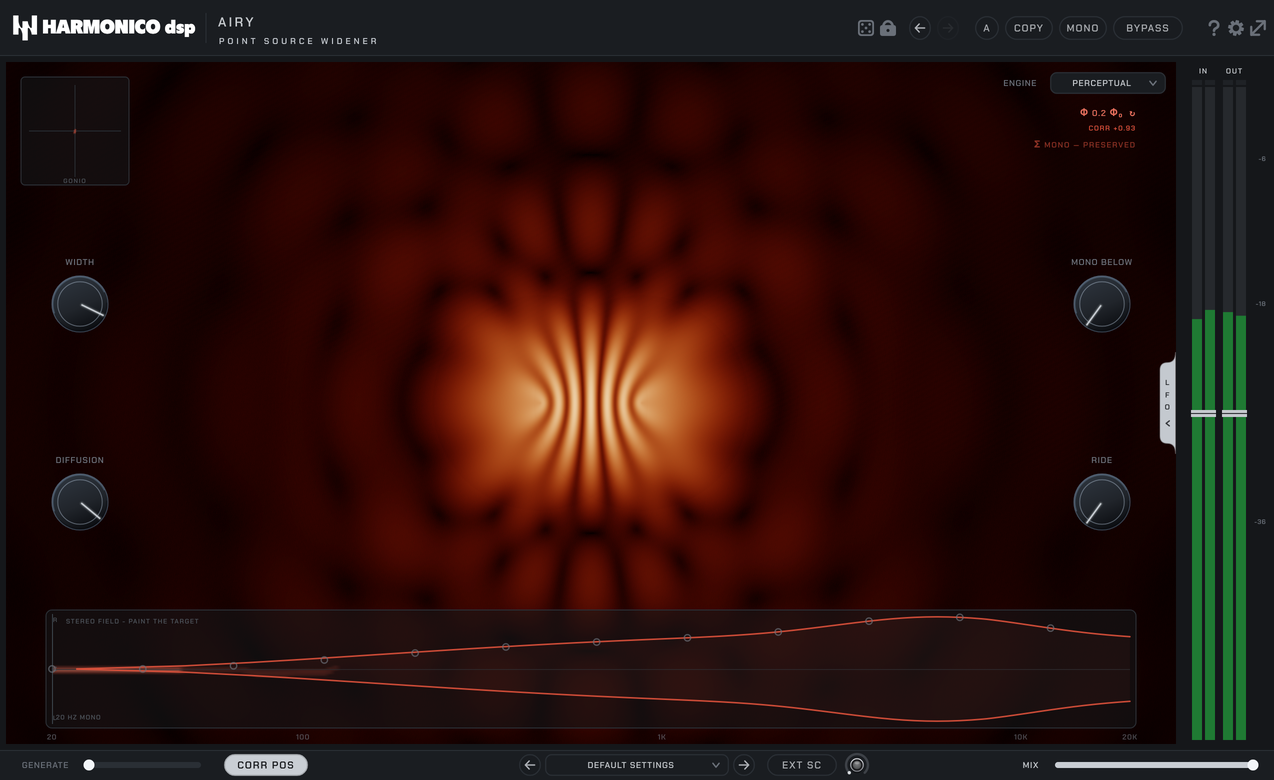
- The scene — a real Bessel-J1 Airy figure: a coherent point source
draws one sharp spot, and the fringes spread as the measured width grows. The goniometer (top left) and the Φ / CORR readouts (top right) track the same physics; Σ MONO — PRESERVED confirms the mono sum is intact.
- Left knobs — WIDTH, DIFFUSION. Right knobs — MONO BELOW, RIDE.
- The stereo field map — the band at the bottom of the scene: your
signal's energy, frequency by frequency, under the target contour you paint.
- Footer — GENERATE, CORR POS, presets, EXT SC (+ sidechain lamp), MIX.
Controls
| Control | What it does |
|---|---|
| WIDTH | The global width target. The engine measures each band and only lifts what falls short — material that is already wide is left untouched. |
| DIFFUSION | Character of the added width, focused ↔ airy: level-like and precise at the bottom, velvet-diffuse at the top. In the SPECTRAL engine it also scales the amount of phase texture. |
| MONO BELOW | True elliptical bass-mono on the output, for both engines — everything below the cutoff is summed to the centre. Default 20 Hz = neutral. |
| RIDE | Width follows the level of the programme — or of an external sidechain (EXT SC pill; the lamp shows the key). The LOWCUT ring around the lamp filters the detection key. |
| ENGINE | PERCEPTUAL (default, zero latency) or SPECTRAL (diffracted texture, FFT latency). |
| GENERATE | Synthesises a Side from the Mid: true mono → stereo, and a thickener for narrow stereo. The low end stays mono. Mono→stereo inserts are supported in Pro Tools. |
| CORR POS | On (default): the L/R correlation is kept ≥ 0 — the vinyl/broadcast-safe zone. Off: maximum width unleashed; correlation may swing negative. |
| MIX | Dry/wet — Side-only, so mono stays exact at any setting. |
The stereo field map
The band at the bottom of the scene is a live map of your stereo field: frequency left to right, energy drawn where it sits between mono (centre line) and wide (edges). The red contour is the width target — paint it with the mouse (the gesture mirrors top/bottom automatically). What you draw is exactly what the engine aims for, in both engines: bands under the contour get filled, bands already there are left alone.
A/B, randomize, themes
- A/B compares two full settings — including the painted target; COPY
copies the current one to the other slot. MONO auditions the mono sum, BYPASS is click-free.
- The dice randomizes, the lock keeps the controls you want out of the
draw. Undo/redo arrows cover everything.
- The gear holds themes (LASER / ARGENT), the built-in help and
update check.
The two LFOs
Open the drawer on the right edge: two LFOs with ASSIGN by learn — click ASSIGN, then the knob to modulate. SYNC locks the LFO to the host transport, on the beat (PHASE offsets the downbeat). Assignments are stored in presets and A/B slots; DEFAULT SETTINGS clears them.
Quick recipes
- Mono synth → wide — GENERATE up (~50–70 %), WIDTH ~70 %, DIFFUSION to
taste: airy for pads, focused for keys that must stay solid.
- Open a stereo piano without phasing it — just raise WIDTH. The
PERCEPTUAL engine measures what's there and adds almost nothing where the recording is already wide — no smearing, no comb.
- Beyond the speakers — CORR POS off, WIDTH high. Spectacular on
headphones; keep an eye on the goniometer and check mono.
- Bus / master polish — small WIDTH moves (10–20 %), MONO BELOW ~100–150 Hz,
CORR POS on. Wider, never louder.
- Sound design — ENGINE SPECTRAL, DIFFUSION high, paint an extreme
contour on the map.
Tips
- Mono-safe is structural: Airy only ever touches the Side. Collapse to
mono at any setting and you get the input's mono sum, bit-intact.
- The output is unclipped float — peaks above 0 dBFS are normal and
intentional (the plug-in lives before your bus limiter). Don't "fix" them.
- If a source refuses to widen, look at the map first: the energy may already
sit at the contour — the engine is doing its job by not adding more.
Specs & support
VST3 · AU · AAX — macOS 10.15+ (Apple Silicon & Intel, universal) · Windows 10/11 (64-bit) · Pro Tools 2023+ (AAX). Zero latency in the PERCEPTUAL engine. Free — no activation. Questions? See the contact page on harmonicodsp.com.