
Field Modulation Processor — Quick Start
Adaptive motion shaper · VST3 · AU · AAX · macOS & Windows
The idea
Most modulation runs on an LFO — a fixed shape at a fixed rate. Field Modulation Processor doesn't. It analyses the incoming signal in real time (energy per band, spectral centroid, coherence) and builds a modulation field that positions a network of all-pass filters. The movement is therefore born from the music itself: smooth and flowing on sustained material, jolting on transients. Ten modes take that field from classic phasing to barberpole and Doppler.
Install & activate
1. Run the installer (macOS .pkg / Windows). It installs VST3, AU (mac) and AAX. 2. Open the plug-in in your DAW — it's fully featured for 14 days. 3. To activate: click the gear icon → Import License… → select the .license file from your purchase email. Unlocks instantly, offline.
The interface
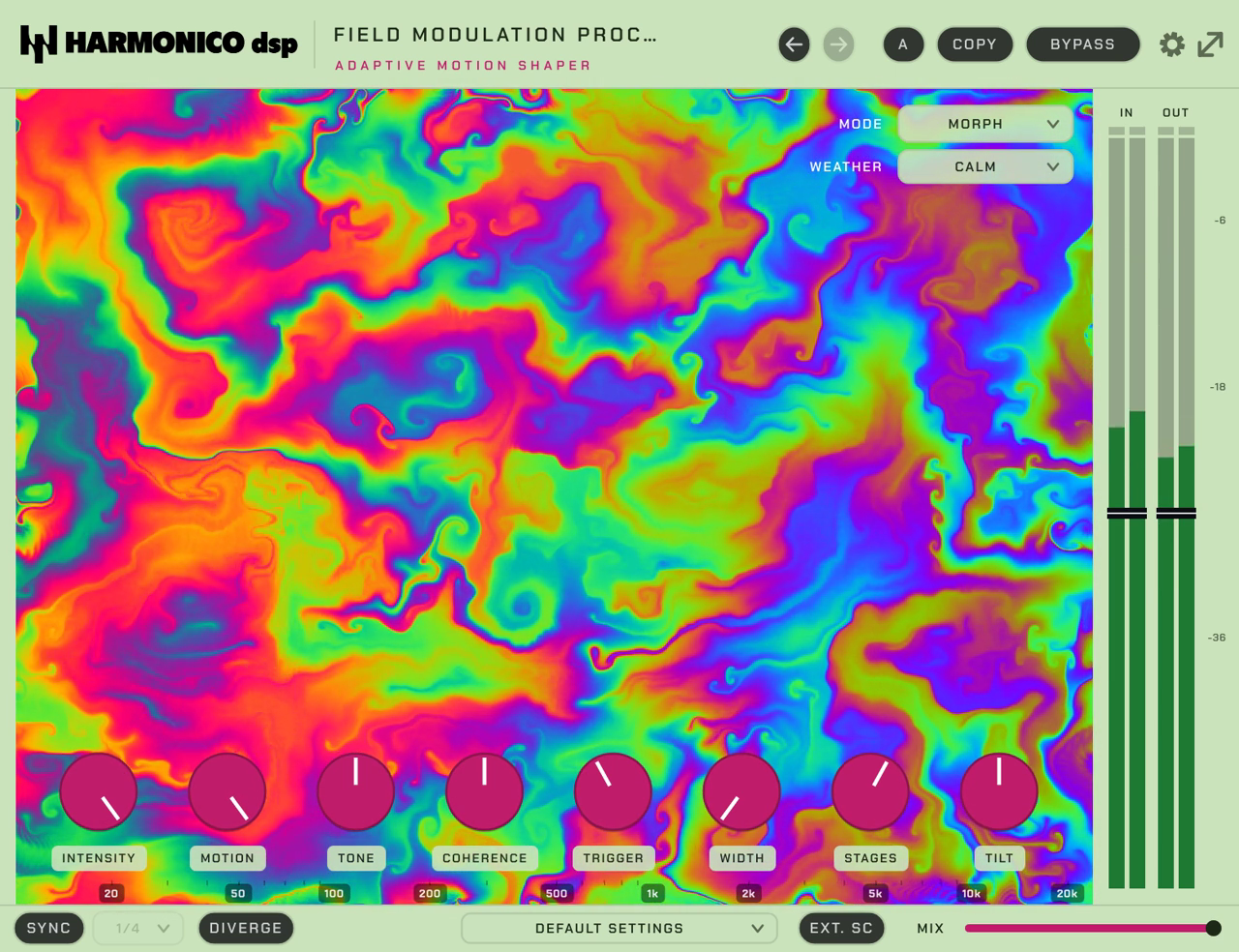
- Mode selector — the type of motion (10 modes, see below).
- Main knobs — Intensity, Motion, Coherence, Tone, plus Tilt and Trigger.
- Field view — the central visual. Its X axis is frequency (a kick lights the
left, hats the right), so you can see what's moving. With Diverge on, two draggable probes (L/R) appear — the points where each channel reads the field.
- Utility — Weather presets, Tempo Sync, external sidechain, Width, Mix, Input/Output.
Controls
| Control | What it does |
|---|---|
| Mode | The motion type — 10 modes (see below). |
| Intensity | Depth / amount of the effect (auto level-matched — pushing it won't cost you level). |
| Motion | Speed / reactivity of the field (how fast it responds and sweeps), not the amount. |
| Coherence | How unified vs. scattered the movement is across the spectrum (tight ↔ diffuse). Repurposed in some modes — see below. |
| Trigger | Keys movement to transients — turn up to make hits drive the motion (default 0). |
| Tilt | Weights where the perturbations land along the spectrum (low ↔ high); centre is neutral. Also drives the Field view. |
| Tone | Spectral bias of the whole field (± tilt), plus feedback damping. |
| Stages | All-pass stages, 2–12 (default 8) — more = denser phasing. Repurposed: VOICES in Chorus/Resonator, BANDS in Formant; inactive in some modes. |
| Weather | Macro presets for the field's character: Calm · Breeze · Storm · Vortex. |
| Sync / Sync Div | Lock motion to tempo and choose the division (1/1 … 1/16, incl. dotted & triplet). |
| Diverge | Enables divergent readout: L/R read the same field at two independent points (the probes). The field stays mono-compatible; only the readout diverges. |
| Stereo probes (L/R) | Draggable points (shown when Diverge is on) that position each channel in the field; they become the listener "heads" in Doppler. |
| Ext SC | Drive the field from an external sidechain. (With Ext SC on and nothing patched, the field goes static.) |
| Width | Detunes the left/right notch frequencies for moving stereo spread (subtle by design; inactive in Vibrato, TZ Flange and Doppler). Default 0. |
| Input / Output | Gain trim in/out (±24 dB). |
| Mix | Dry/wet (default fully wet). |
Tracking vs mixing: the Latency setting (gear menu) offers Low latency (0) for tracking and Aligned (256 samples, reported to your DAW) for phase-tight mixing. TZ Flange always uses 256 samples.
The 10 modes
- Morph — the signature adaptive blend.
- Phaser · Flanger · Chorus — the classics, driven by the field.
- Vibrato — the exception: a dedicated audible LFO (3–9 Hz), full-wet pitch wobble (not signal-driven).
- Resonator · Formant — pitched / vowel-like colouration.
- TZ Flange — through-zero flanging (jet sweeps); here the Coherence slot becomes Depth.
- Barberpole — endless-rising/falling shift.
- Doppler — pitch/space movement as if the source flies past (probes = listener heads; Coherence inactive).
Quick recipes
- Living pad — Mode Morph, Motion mid, Coherence high, Weather Breeze, Mix ~50 %.
- Rhythmic phaser on keys/gtr — Mode Phaser, Sync on (1/8), Trigger up so hits push the sweep.
- Sound-design chaos — Mode TZ Flange with Depth high, Weather Vortex, Diverge on and the probes dragged apart. (Or Doppler with Diverge on — skip Coherence, it's inactive there.)
Tips
- Weather is the fastest way in — pick a vibe, then fine-tune with Motion/Intensity.
- Turn Trigger up on drums/percussion to make the movement play with the groove.
- Turn Diverge on and drag the probes apart for width that moves, not a static widener.
Specs & support
VST3 · AU · AAX — macOS & Windows. 14-day full trial. Questions? See the contact page on harmonicodsp.com.