
Rayleigh — Quick Start
Multiband depth field · VST3 · AU · AAX · macOS & Windows
The idea
Rayleigh is a multiband depth processor. Instead of making a sound louder or brighter, it places each frequency band at its own distance. Push a band away and everything real distance does to sound happens together: its level falls, the air absorbs its highs, its transients soften, the room's early reflections rise around it and its stereo image narrows. Pull it closer and it gains level, presence and proximity warmth.
Use it to build true front-to-back staging — a lead vocal close while the pads sit at the back of the room — instead of faking depth with volume and EQ.
Install & activate
1. Run the installer (macOS .pkg / Windows). It installs VST3, AU (mac) and AAX. 2. Open the plug-in in your DAW — it's fully featured for 14 days. 3. To activate: click the gear icon → Import License…. You can either pick the .license file from your purchase email, or paste its contents straight into the window if the attachment did not survive your mail client. Unlocks instantly, offline.
Requires macOS 12 or later, or Windows 10/11 (64-bit).
The interface
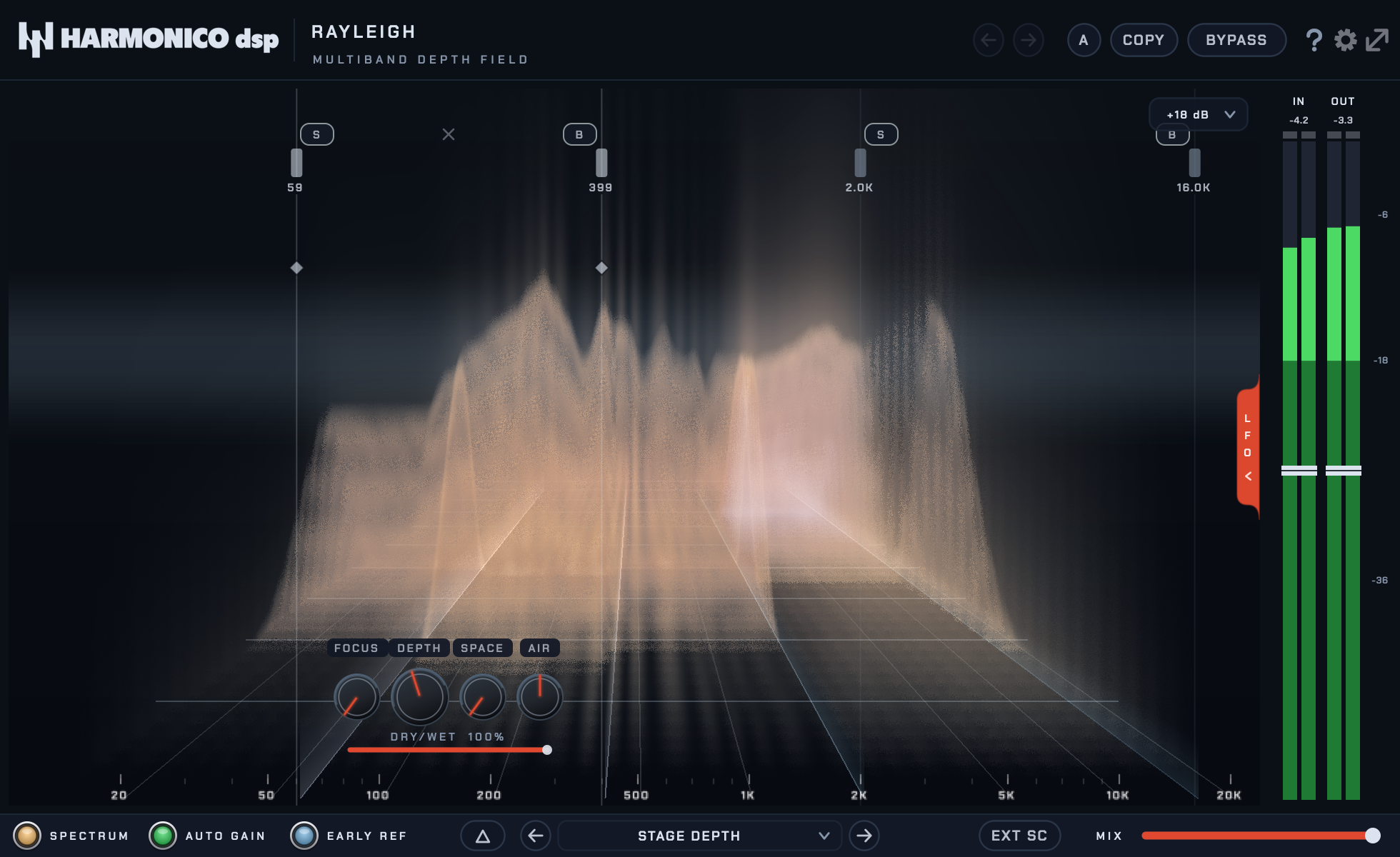
The scene is the plug-in: frequency runs left to right, energy is the height of the terrain, and depth is how far back a band's ridge sits on the floor. You read the placement instead of imagining it.
1. Click on the spectrum to add a band (up to 4). Nothing happens until you do. 2. Drag its left / right edges to set the frequency range. 3. Turn DEPTH to push the band away from the listener, or pull it closer. 4. Shape the distance with AIR, SPACE and FOCUS. 5. Balance the whole effect with MIX (footer slider).
Band controls
| Control | What it does |
|---|---|
| DEPTH | The main knob. Positive pushes the band away: its level drops and the air absorbs its highs, like a source moving to the back of the room. Negative pulls it toward you — more level, more presence. |
| AIR | How strongly the air absorbs high frequencies with distance. More AIR means a darker, more veiled far field, and a brighter near field. |
| SPACE | Spectral haze: the further the band sits, the more its fine detail dissolves into a diffuse wash, like a room blurring a source. |
| FOCUS | Softens the band's transients as it moves away, because distance blurs attacks. Zero keeps transients intact at any depth. |
| Edge softness | The small diamond on each band edge sets how wide the transition into the untreated signal is, from 1/6 to 2 octaves. ALT-click to reset. |
| DRY / WET | Blends this band with its original signal. |
| SOLO / BYPASS | Per band: SOLO isolates it, BYPASS disables it. |
Feather the edges, especially inside the spectrum
A band drawn in the middle of the spectrum has two borders into untreated sound, and a hard border is audible: the low mids walk away while the bass and the upper mids stay put, and the seam shows on every held note. Drag the diamonds inward and the transition spreads over up to two octaves, so nothing announces where the band begins.
The same applies at the top. A band that stops at 12 kHz leaves the cymbals and the air in front while the rest of the kit recedes, which no room does. Either run the band to the top of the spectrum or feather its upper edge.
Auto gain
AUTO GAIN is off when you open the plug-in, so a first move of DEPTH is heard for what it is: pushing a band away makes it quieter, and that loss is part of how your ear reads distance.
Switch it on once you are placing rather than exploring. It then holds the overall loudness constant while you move DEPTH, so you judge placement and not level. On a gentle setting the difference is a few tenths of a decibel; on a band pushed far back it can be eight.
Early reflections
EARLY REF feeds pushed-back bands into a subtle early-reflection pattern. The direct-to-reflected ratio is the main cue your ear uses for distance, which is why a band pushed back with it on reads as further away rather than merely duller.
Turn it off for an EQ-only depth: busses that already carry their own reverb, or strict mono work. SPACE then only drives the spectral haze.
Sidechain depth-riding
With EXT SC on, each band gains a RIDE control. When the sidechain signal plays in that band's range, the band moves back, and returns when it stops — you see it recede in the scene. ATK / REL set how fast it ducks away and comes back; right-click either knob to pick a musical division locked to the host tempo.
Push pads back only while the vocal sings, and let them return between phrases.
LFOs & modulation
Two assignable LFOs live behind the LFO tab on the left edge of the spectrum. Click ASSIGN on an LFO, then click any band control to route it; click more controls to drive several at once. A coloured ring wraps each modulated knob and shows the sweep range with a live dot. Per LFO: RATE (Hz, or a musical division when SYNC is on), SHAPE, PHASE and DEPTH.
Quick recipes
- Front-to-back staging on a mix — two bands: the bottom, 60 to 400 Hz, pulled
forward a little; the top, 2 to 16 kHz, pushed back with some AIR and a little SPACE. Nothing is boosted and nothing is cut, yet the mix gains a front row and a back row.
- Pads to the back — one band across 200 Hz to 8 kHz, DEPTH well positive,
AIR and SPACE generous, FOCUS around a third.
- A kit in the room — one band from 100 Hz to the top, DEPTH around a third,
SPACE at 0.6, FOCUS at zero. The reflections rise while the attacks stay sharp.
- Move one element of a mix — Rayleigh does not separate sources, it treats a
band, so this works when the part owns a band. Solo the band first to check who else lives there.
- Further away without getting quieter — everything above 500 Hz back by a
fifth, AIR at 60 per cent, SPACE and FOCUS at zero, and the lower edge feathered to the maximum. The loudness barely moves and the top is clearly further off.
Tips
- Start with AUTO GAIN off to hear what DEPTH does, then switch it on to place.
- DELTA (triangle pill) plays only the difference, latency-aligned, which is
the fastest way to hear exactly which resonances a band is moving.
- A band that sounds like an effect is usually too deep. Distance is a small move:
a fifth of the knob already reads as a step back.
- FOCUS is what makes an attack sound far away. On percussive material it does
more than DEPTH.
- The FFT size (gear menu) trades latency for resolution: 2048 for mixing,
512 when you need to play along.
Specs & support
VST3 · AU · AAX — macOS 12+ and Windows 10/11 (64-bit). 14-day full trial. Questions? See the contact page on harmonicodsp.com.