
Spectral Mass Rebalance — Quick Start
Multiband dynamic tilts · VST3 · AU · AAX · macOS & Windows
The idea
Spectral Mass Rebalance (SMR) is an EQ that works on energy, not on fixed curves. Instead of boosting fixed frequencies, it measures the center of mass of the energy inside each band you draw, then tilts the energy around that pivot — shifting weight between lows and highs while keeping the band's total energy constant. Because the pivot follows the real content, the effect adapts to the material: when a voice rises, the pivot rises with it. Up to 4 draggable bands, each with its own dynamics (ENV) and pivot mode, plus a minimum-phase Analog mode.
Install & activate
1. Run the installer (macOS .pkg / Windows). It installs VST3, AU (mac) and AAX. 2. Open the plug-in in your DAW — it's fully featured for 14 days. 3. To activate: click the gear icon → Import License… → select the .license file from your purchase email. Unlocks instantly, offline.
The interface
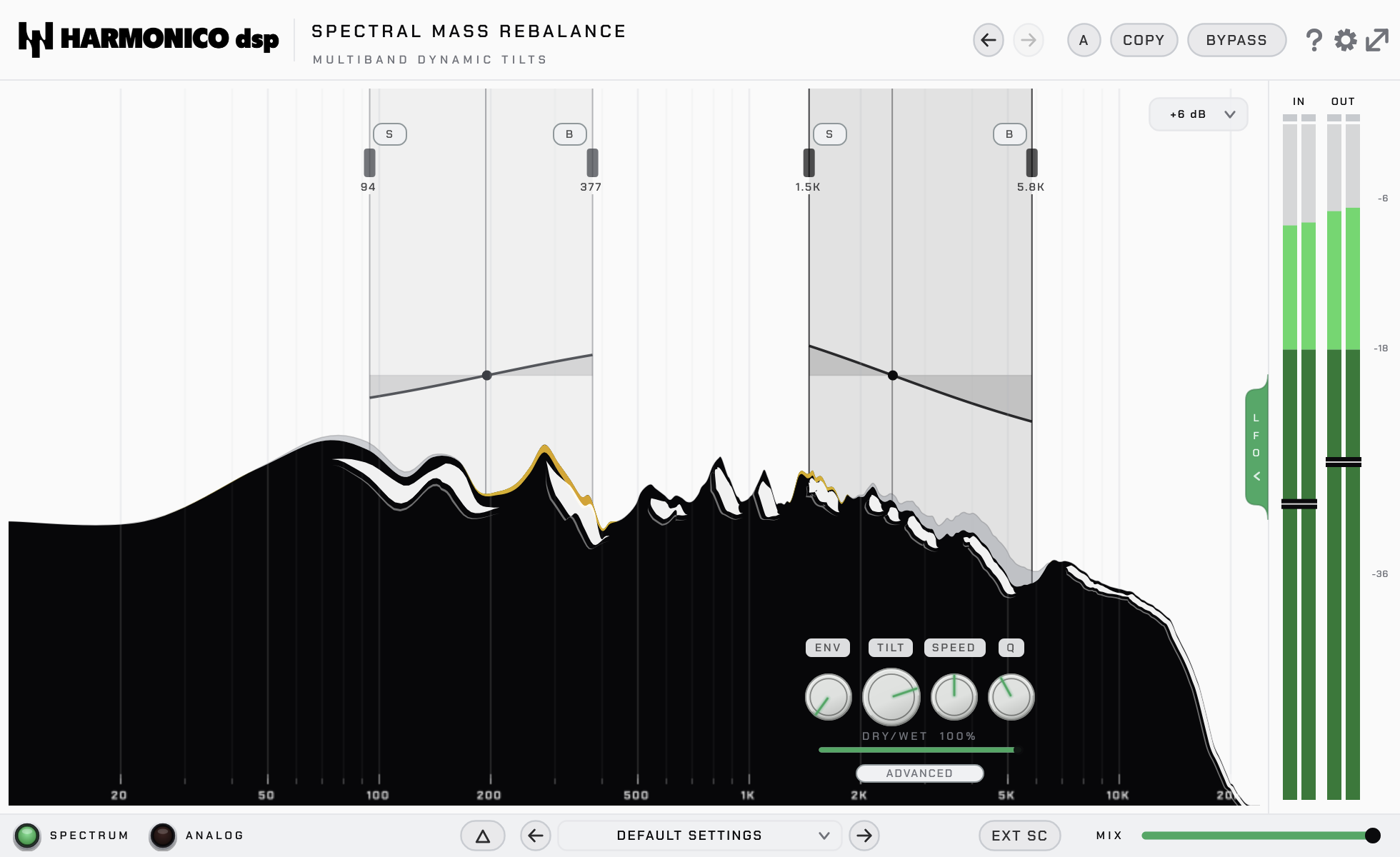
- Spectrum analyser — a live, display-only FFT of the input/output. The output
curve is literally input × gains, so before/after comparison is exact.
- Bands — click to create, drag the left/right edges to set the range
(10 Hz–24 kHz). Up to 4, and they can overlap (gains multiply).
- Pivot — the content-following point each band tilts around, drawn on the spectrum.
- Per-band panel — TILT, Q, SHIFT, DRY/WET, SOLO, BYPASS, plus an
ADVANCED section (MODE, ENV, ATK/REL, SPEED).
- Footer / global — MIX, ANALOG, SPECTRUM (show/hide analyser), presets, A/B, undo.
- IN / OUT meters — peak meters that are also gain controls (drag them, ±24 dB).
Controls
| Control | What it does |
|---|---|
| TILT | Tilts the band's energy around the pivot (−1..+1). > 0 pushes weight toward the top of the band, < 0 toward the bottom — a see-saw, not a boost. Total band energy stays constant. |
| Q | Morphs the curve shape (0..1, default 0.4). 0 = smooth, bounded Baxandall shelf; 1 = pure tilt (constant slope that carries all the way to the band edges). |
| SHIFT | Biases the pivot toward one edge of the band (−1..+1), in octaves. At +1 the pivot sits at the top edge and the tilt acts as a one-sided shelf. |
| MODE | Pivot calculation: Mean / Peak / Median / Fixed (see below). |
| ENV | Makes the tilt follow the dynamics: modulates tilt depth vs the band's own recent average. 0 = constant tilt; up = doubles on louder passages, eases off when quiet. Reacts to variation, not absolute level, so it doesn't pump. |
| ATK / REL | Attack (1–300 ms, default ~25 ms) and release (10–1000 ms, default ~180 ms) of the ENV follower. Short ATK catches transients; long REL gives slow, breathing moves. |
| SPEED | Pivot inertia (0..1, default 0.5). Low = fast, reactive pivot; high = slow, near-frozen pivot. |
| DRY/WET (band) | Per-band blend of the spectral tilt. At 0 the band does nothing (gain = 1 everywhere). |
| SOLO | Auditions the band's frequency range via clean IIR HP/LP filters (no FFT ringing). |
| BYPASS (band) | Mutes just this band's processing (its smoothers keep running, so no jump on re-enable). |
| MIX | Global dry/wet (footer). 0 = 100 % dry, 1 = 100 % wet (default 1). Dry is latency-aligned, so no comb filtering. |
| ANALOG | Zero (default) = clean, transparent, zero added phase; Analog = adds the minimum-phase rotation of a real 1st-order filter for subtle character. Magnitude (level) is identical either way. |
| IN / OUT | Input/output gain trim (±24 dB), set by dragging the meters. IN is applied before analysis (you can drive the ENV detector); OUT after processing (match the bypassed level). |
| FFT SIZE / LATENCY | Gear menu: 512 (~12 ms), 1024 (~23 ms, default), 2048 (~46 ms). Smaller = less latency, coarser low-frequency resolution. |
Pivot modes
Each band picks how its pivot is found (ADVANCED → MODE):
- Mean (default) — the spectral centroid: magnitude-weighted average frequency.
Stable, tracks the band's overall brightness. Good everywhere.
- Peak — the strongest frequency (lightly smoothed). Nervous; follows the
dominant note/partial. Great for melodic material and bass.
- Median — the frequency that splits the band's cumulative energy in half.
More robust than Mean when a single loud peak would skew the average.
- Fixed — the geometric center of the band,
√(fLow·fHigh). The pivot never
moves: a static, 100 % predictable EQ-like tilt.
Zero vs Analog — a separate choice (ANALOG button). Zero applies pure real gains (no phase shift added — best for mastering and strict parallel work); Analog adds the minimum-phase response of a 1st-order shelf for analog-style character. The magnitude, and therefore the level and the drawn curve, is the same in both.
LFOs & modulation
Two assignable LFOs live in the drawer on the right edge (click the LFO tab).
- ASSIGN — click, then click any knob to route the LFO to it (several targets
per LFO are fine). CLEAR removes the routing; the modulation rings on the knobs show depth at a glance.
- RATE / DEPTH / PHASE — speed (free Hz or synced divisions), amount, offset.
- SYNC — locks the LFO to the host transport: cycles land on the beat
during playback (PHASE shifts the downbeat), so what you hear is what bounces.
- LFO routings are saved with presets and the A/B slots, and cleared by
DEFAULT SETTINGS.
Quick recipes
- Tame a harsh mix — draw a band ~1.5–5 kHz, TILT slightly negative to shift
weight down out of the presence region, MODE Mean, a touch of ENV (~0.3) so it only clamps down on the loud, harsh moments. Level stays put.
- Add air, dynamically — band ~8–18 kHz, TILT positive, ENV up with a short
ATK: the top sparkles more on transients and settles back on sustains, without a static high-shelf's constant hiss.
- Balance a bass-heavy master — full-band ~20 Hz–20 kHz, TILT ~−0.30 (warm,
adaptive global tilt), FFT 2048, ANALOG off (zero phase), Q low, SPEED high so the pivot stays stable, ENV 0. Energy conservation keeps the A/B honest.
Tips
- The pivot follows the content — that's the whole point. On a rising vocal,
a Mean pivot rides up with it, where a fixed EQ shelf would treat a low verse and a high chorus the same.
- The level doesn't move when you turn TILT — by design (per-band energy
conservation). You're changing timbre, not loudness, so A/B is honest. Use OUT only for fine level-matching against bypass.
- For fine low-frequency work, switch to FFT 2048: at 512 a bin is ~86 Hz,
too coarse for a narrow 30–150 Hz band. And push IN to drive the ENV detector harder.
Specs & support
VST3 · AU · AAX — macOS & Windows. 14-day full trial. Questions? See the contact page on harmonicodsp.com.